
Today we are releasing the version 1.0 of Lexxy. Lexxy is a rich text editor for Rails built on Lexical. It already powers Basecamp, Fizzy and many others, and it will become the default editor in Rails. I recently presented it in Rails World (slides, video coming soon). This is the article version of my talk.
Trix hit a wall
Trix has been our editor since 2015, and every Rails app’s editor since Action Text shipped in Rails 6. It’s small and reliable, and it has served millions of people for a decade. But in the last few years our customers kept asking for features like tables or code highlighting, and we kept struggling to deliver them. The reason is the Trix document model.
A Trix document is a flat list of blocks. A block is a line of text with some labels attached, like quote, bullet list, bullet. There is no tree, and a block can never contain another block. Nesting is an illusion: at render time, adjacent blocks with the same labels get wrapped together.
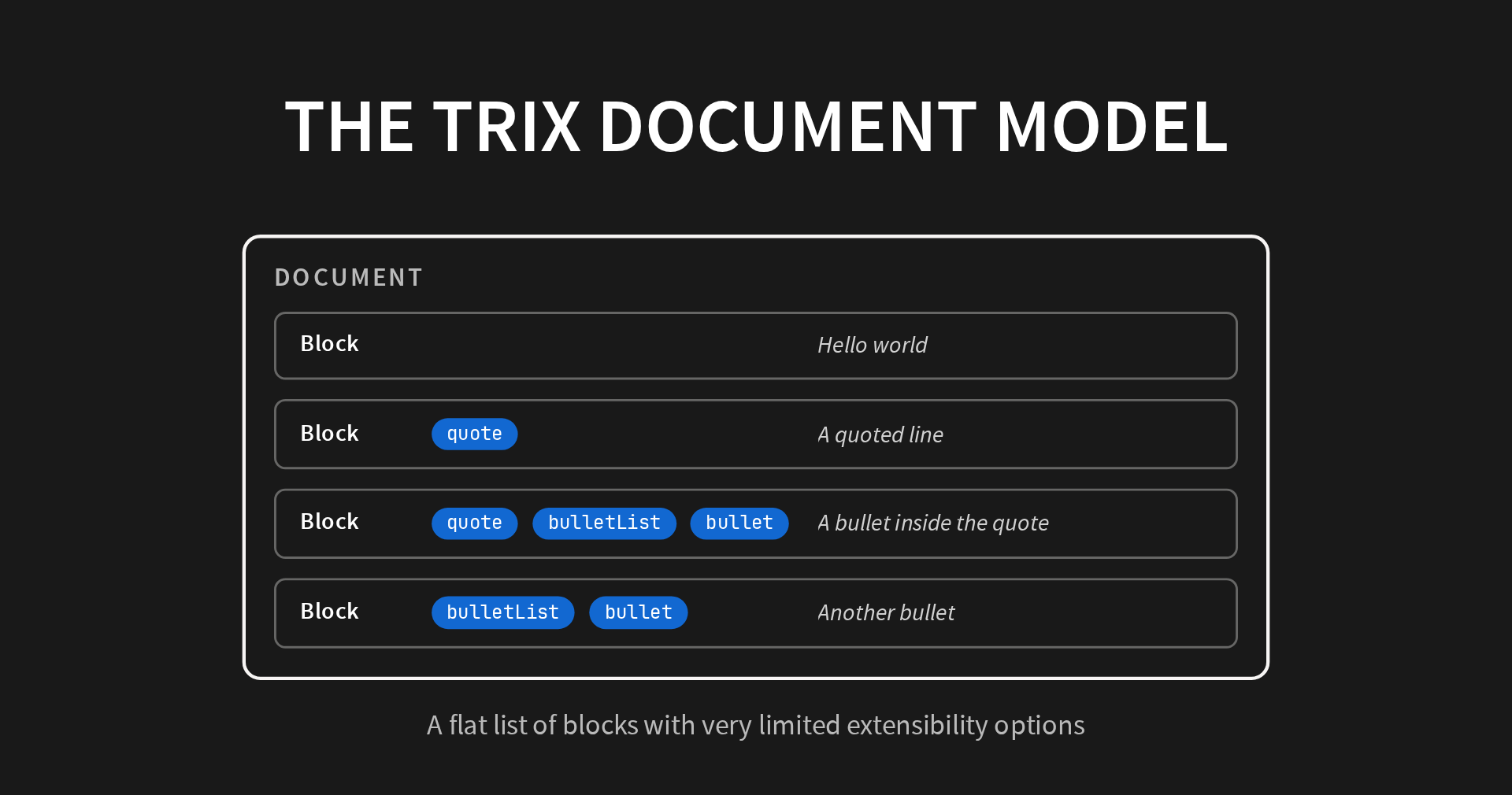
That design bought a lot of simplicity, but you can’t express something like a table with it. Two cells next to each other would carry exactly the same labels, so Trix would merge them into one. The model can say “this bullet is one level deeper”. It cannot say “this cell is different from the cell next to it”. A tables issue has been opened since 2015! The model just can’t do it.
The second problem was maintenance. An editor built on contenteditable behaves differently in every browser and even changes from time with operating system releases. In 2024, three iOS releases in a row broke typing, dictation or the caret in Trix, and each one cost us real effort to work around. Check this one as an example.
Why Lexical
This was a conversation we had at 37signals for years:
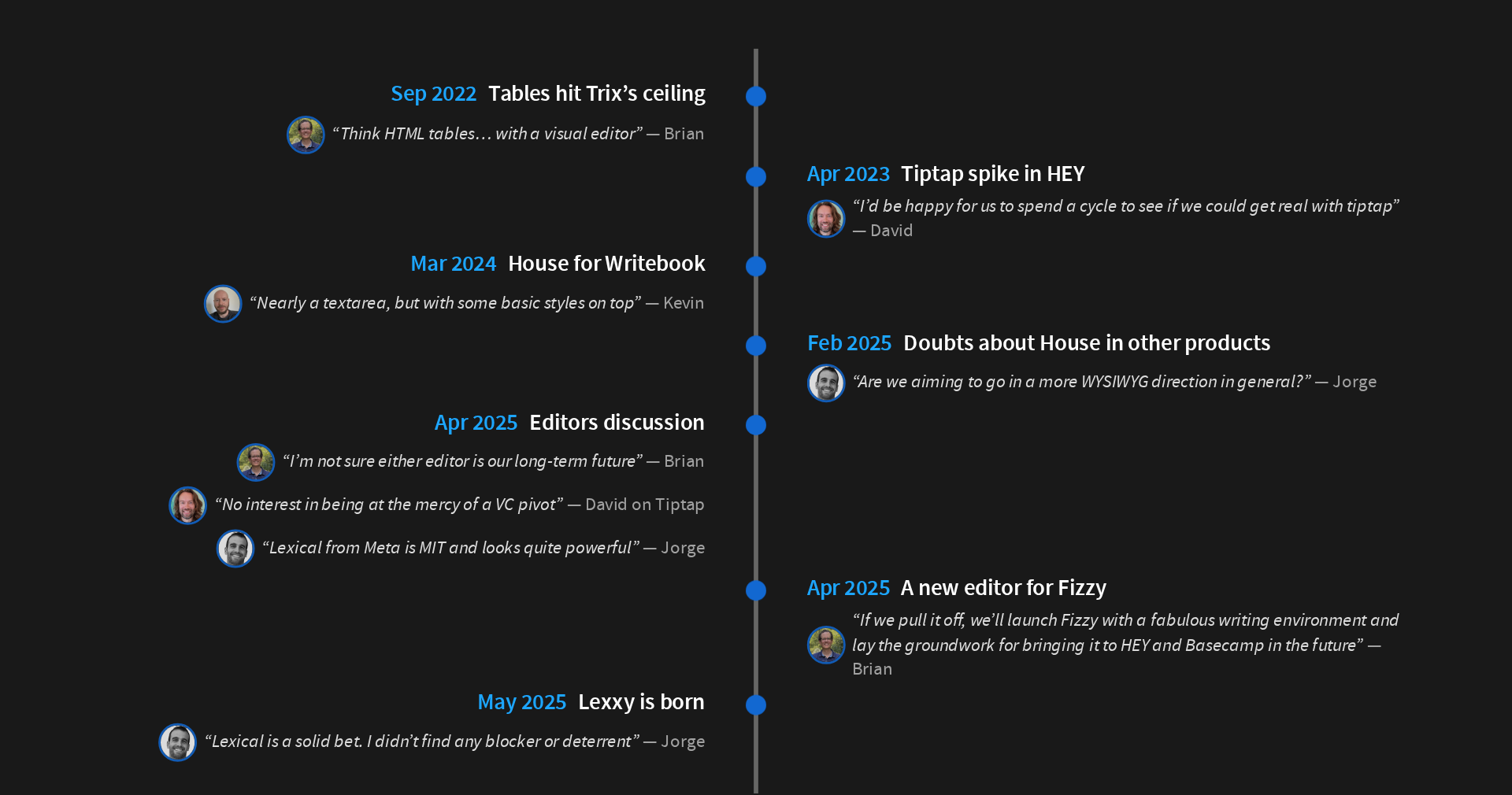
- 2022. We started a project to add tables to Trix. We gave up after a week. The document model can’t represent two-dimensional things.
- 2023. I built a proof of concept with Tiptap inside HEY. We liked it, but we never started a serious project with it.
- 2024. We built House, our own Markdown editor, for Writebook. Not WYSIWYG, but WYSIWYM: what you see is what you mean. A wonderful editor for long-form writing like books or technical documentation.
- 2025. We tried House in another product, and it didn’t fit. For most apps, WYSIWYG was just the right answer.
- 2025. We had the discussion again, and this time we looked at the whole field.
David ruled out Tiptap, CKEditor and the other commercial editors: an open source core with features kept proprietary, and a sales team behind them. We didn’t want our editor to depend on somebody else’s licensing decisions.
Then we found Lexical: MIT, from Meta, and very powerful. I spent two weeks evaluating it, and in May we made the call to go with it.
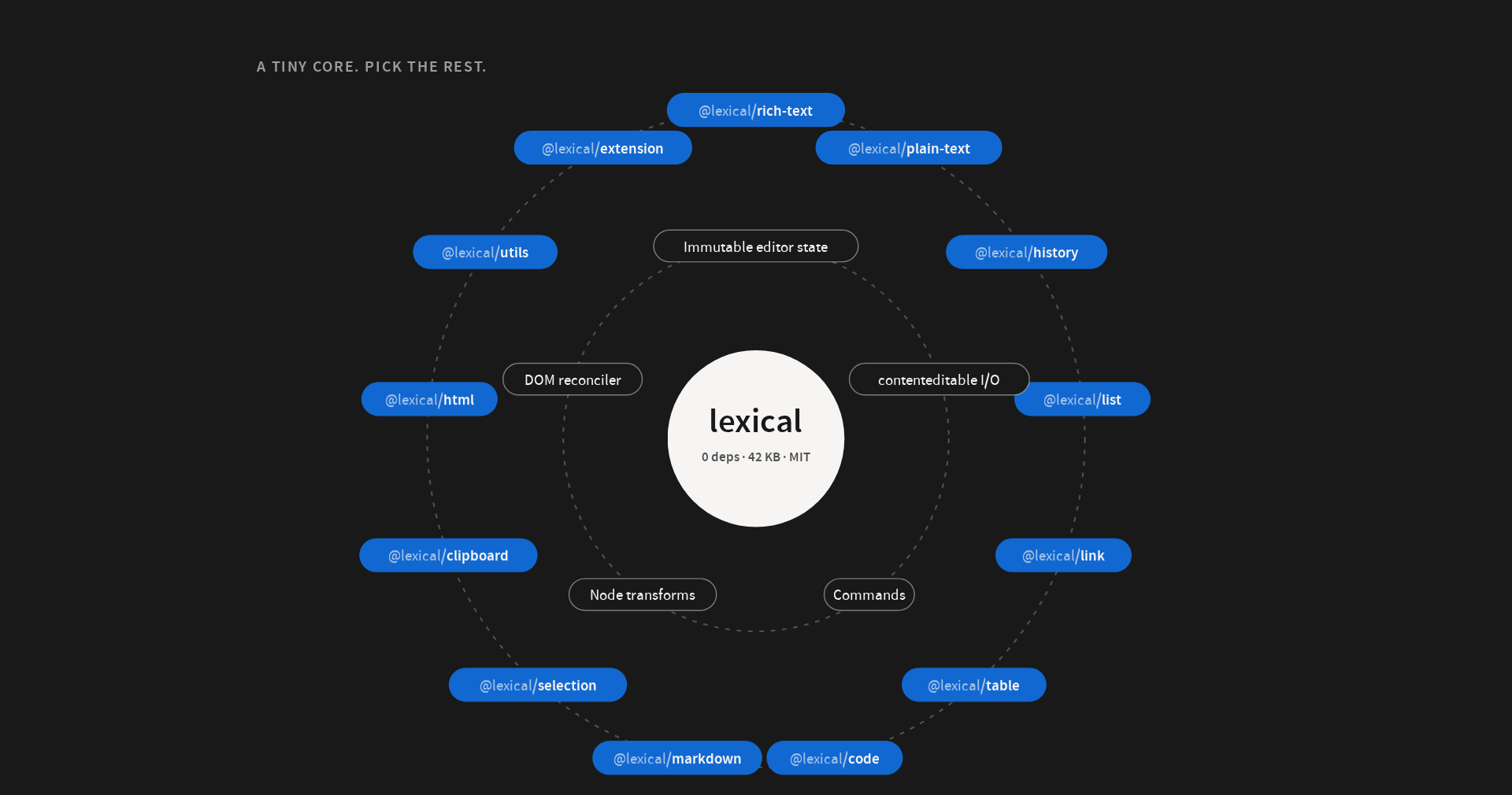
Lexical’s core has zero dependencies and weighs forty-two kilobytes. In a way, it validates the approach that Trix pioneered. The document is an immutable state you never mutate directly, you just get new snapshots when performing updates; contenteditable is an input device and a rendering surface, never the source of truth. It has a DOM reconciler to update the actual DOM very efficiently, and other primitives to deal with handling commands and node transformations. Everything else, from lists to tables to markdown, is a package in the orbit. Lexxy uses thirteen of them.
Lexical solved the maintenance problem too. Meta’s products like Facebook or Instagram use Lexical and their user count is in the hundreds of millions. This means that even small issues with new keyboards and devices are fixed fast by the dedicated Meta team that maintains it. Furthermore, Meta’s business is the products, not the editor. We much rather liked this structure of incentives for the long-term investment an editor represents.
The iceberg
The plan was simple. Pick Lexical, wire it up to Action Text, add a toolbar and ship it. Well, it didn’t go exactly like that.
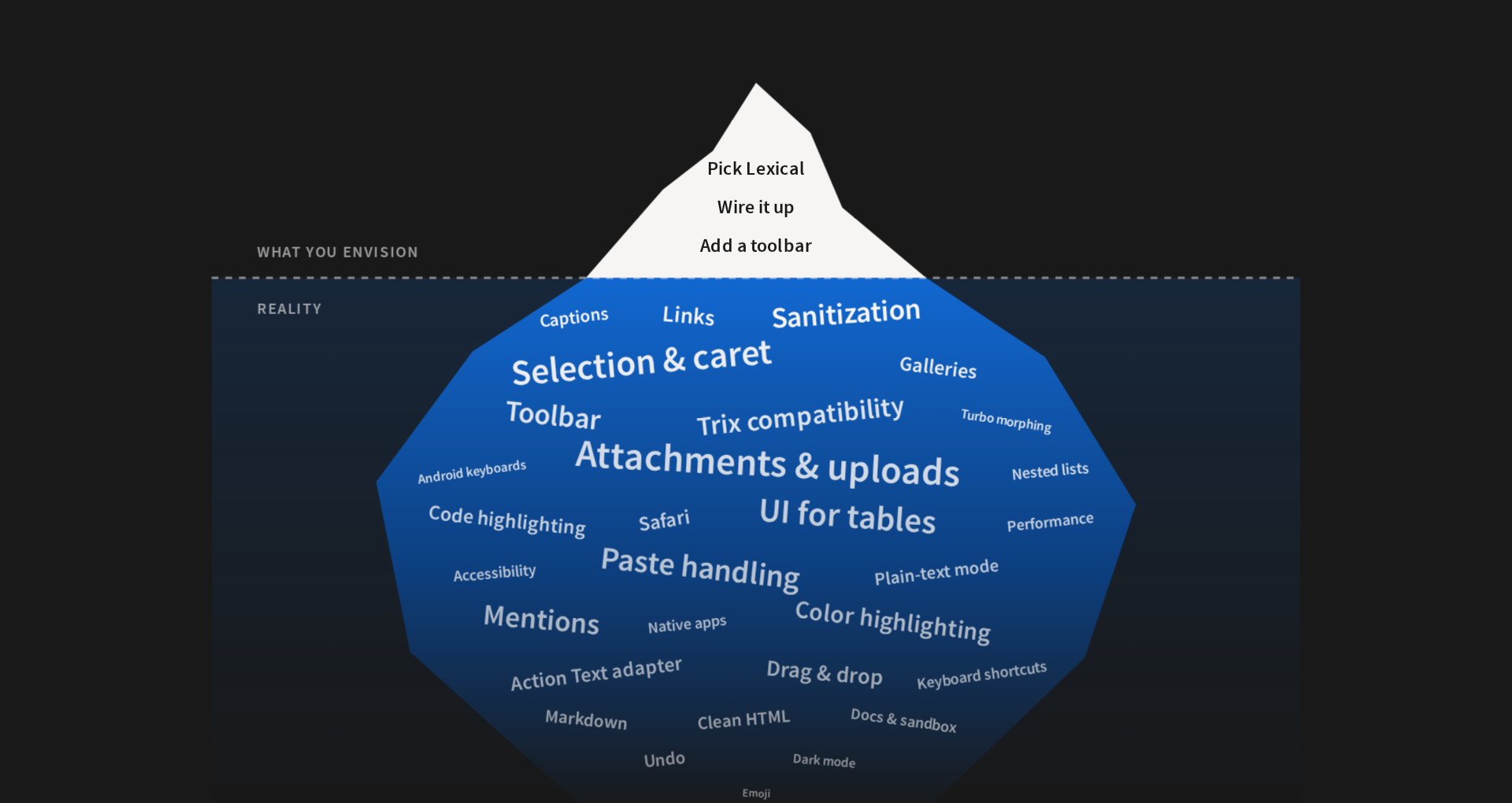
Lexxy today is thirteen thousand lines of vanilla JavaScript on top of Lexical. A great editing experience is very hard to get right. An editor is a machine where the user can change the state in a thousand different ways, and the possible permutations are countless. For example. you have two images one after the other and want to put the cursor between them, but there is nothing there to put a cursor in. Or somebody pastes from Google Docs, and you have to turn a pile of inline styles and empty spans into clean markup. And then Safari, and Android keyboards, and the clipboard, and undo, and…
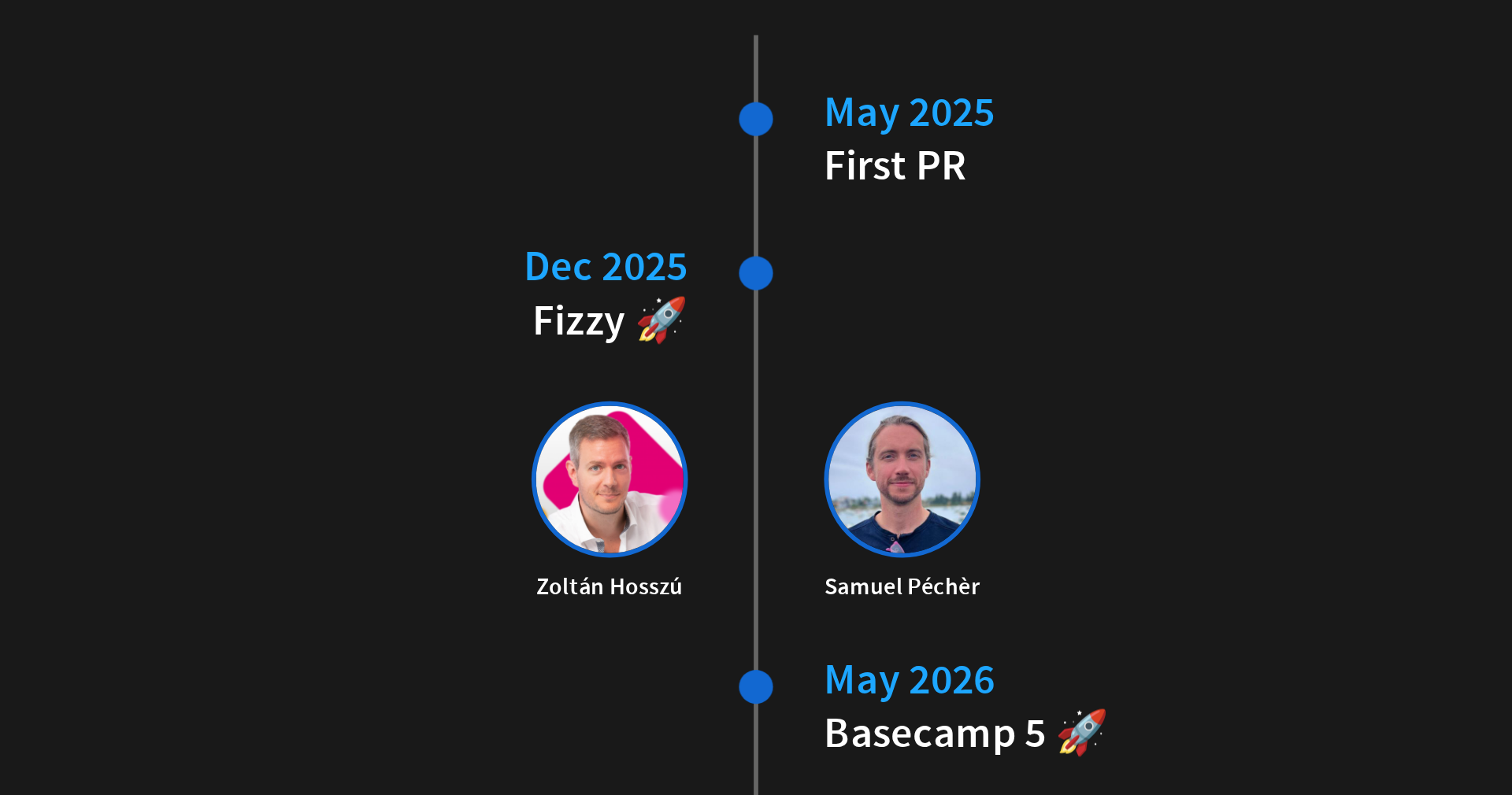
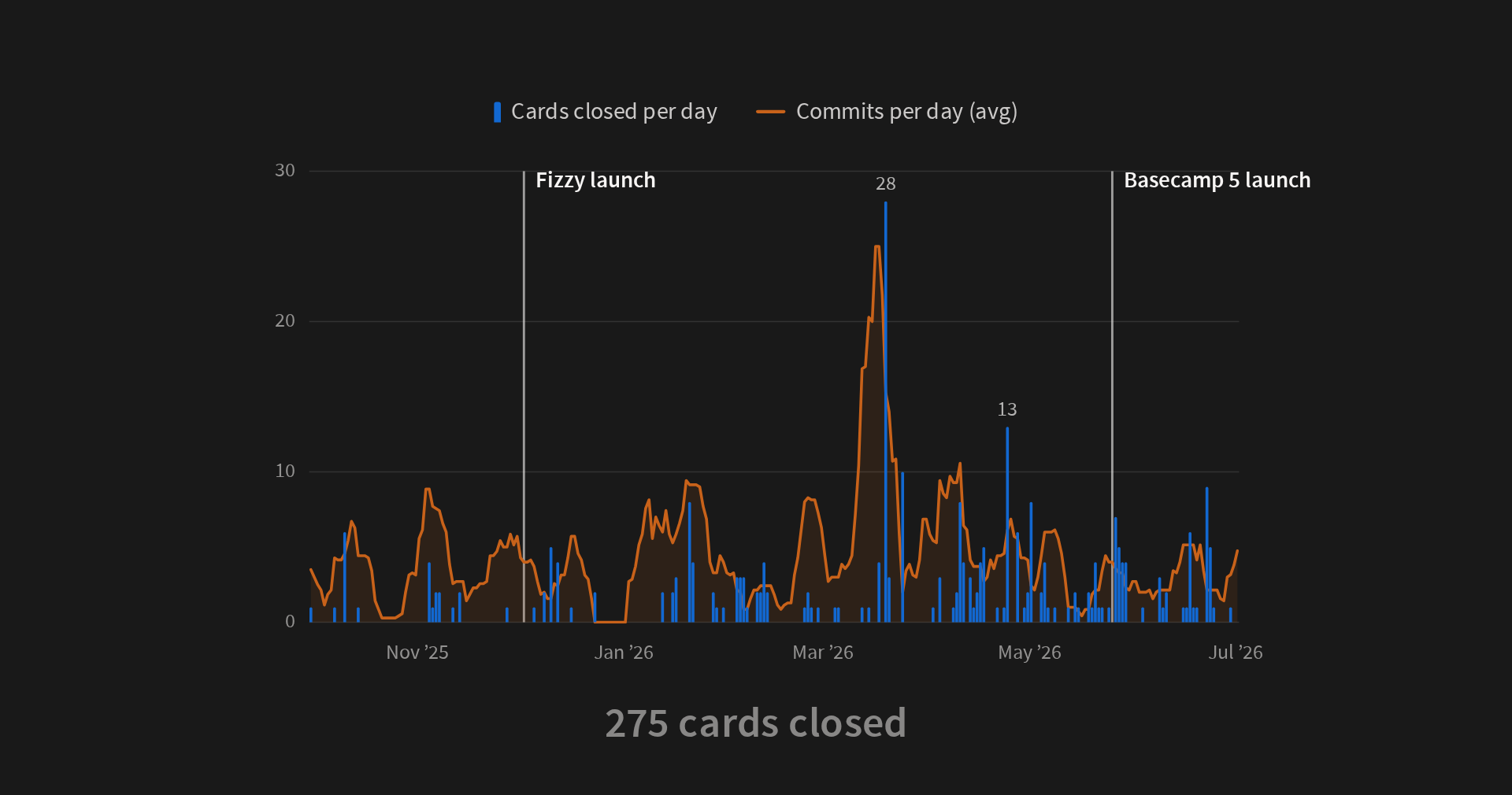
The first pull request landed in May 2025. Fizzy launched with Lexxy in December, and Basecamp 5 in May this year. Basecamp was the real test: twenty years of content written with Trix, and people who use the editor all day, every day. Zoltán Hosszú and Samuel Péchèr were the key people who made this happen. The took a very green version of Lexxy, added a ton of features (including Tables) and polish, and they fixed countless bugs. They also pulled off a remarkable milestone: seamlessly switching millions of Basecamp users from Trix to Lexxy.
What’s included?
We didn’t want a to build Trix with tables. We had Lexical and we had agents to help, so we wanted to be ambitious here. We went for the whole package.
Features
In terms of major features:
- A color highlighter, built in instead of this being a custom Basecamp extension, as it was with Trix.
- Tables, with an interface we worked hard to keep simple and accessible.
- Markdown. You type it, you get rich text.
- Code blocks with syntax highlighting as you type, in more than twenty languages.
- Image galleries you can navigate and reorder with the keyboard.
- Prompts. Type a character, get a menu: mentions, emoji, or whatever your app needs.
- Links by pasting a URL over selected text.
- Previews of attachments like videos and PDFs, rendered as your app renders them.
Action Text Native
Lexxy is also Action Text native. Action Text stores attachments in a canonical format that Trix doesn’t speak, so it translates on save and again on render. We taught Lexxy to emit exactly that markup. What you see in the editor is what gets saved, and what gets saved is what your app renders. Your existing content, attachments and views keep working.
That opened another door. Action Text now talks to an editor adapter, with an implementation for Trix and one for Lexxy, so switching is one line: config.action_text.editor = :lexxy. Here the credit goes to Sean Doyle, who started that pull request before Lexxy existed and took it to the finish line with our input. It ships with Rails 8.2, and we hope other editors will use it too.
Extensibility
And you can extend Lexxy. Extensions are built on Lexical’s own mechanism, and this is not a second-class API: Lexxy itself is thirteen extensions, tables included, and Basecamp has nine more.
class MyExtension extends Lexxy.Extension {
  get enabled() { … }

  get allowedElements() { … }

  get lexicalExtension() {
    return this.defineExtension({
      name: "my-extension",
      nodes: [ … ],
      register(editor) { … }
    })
  }

  initializeToolbar(toolbar) { … }

  dispose() { … }
}

Lexxy.configure({ global: { extensions: [ MyExtension ] } })
My favorite of how extensible is Lexxy are voice notes in Basecamp: you record, you see the waveform while you talk, and it becomes a player inside the document. About a thousand lines, without forking or patching anything.
Performance
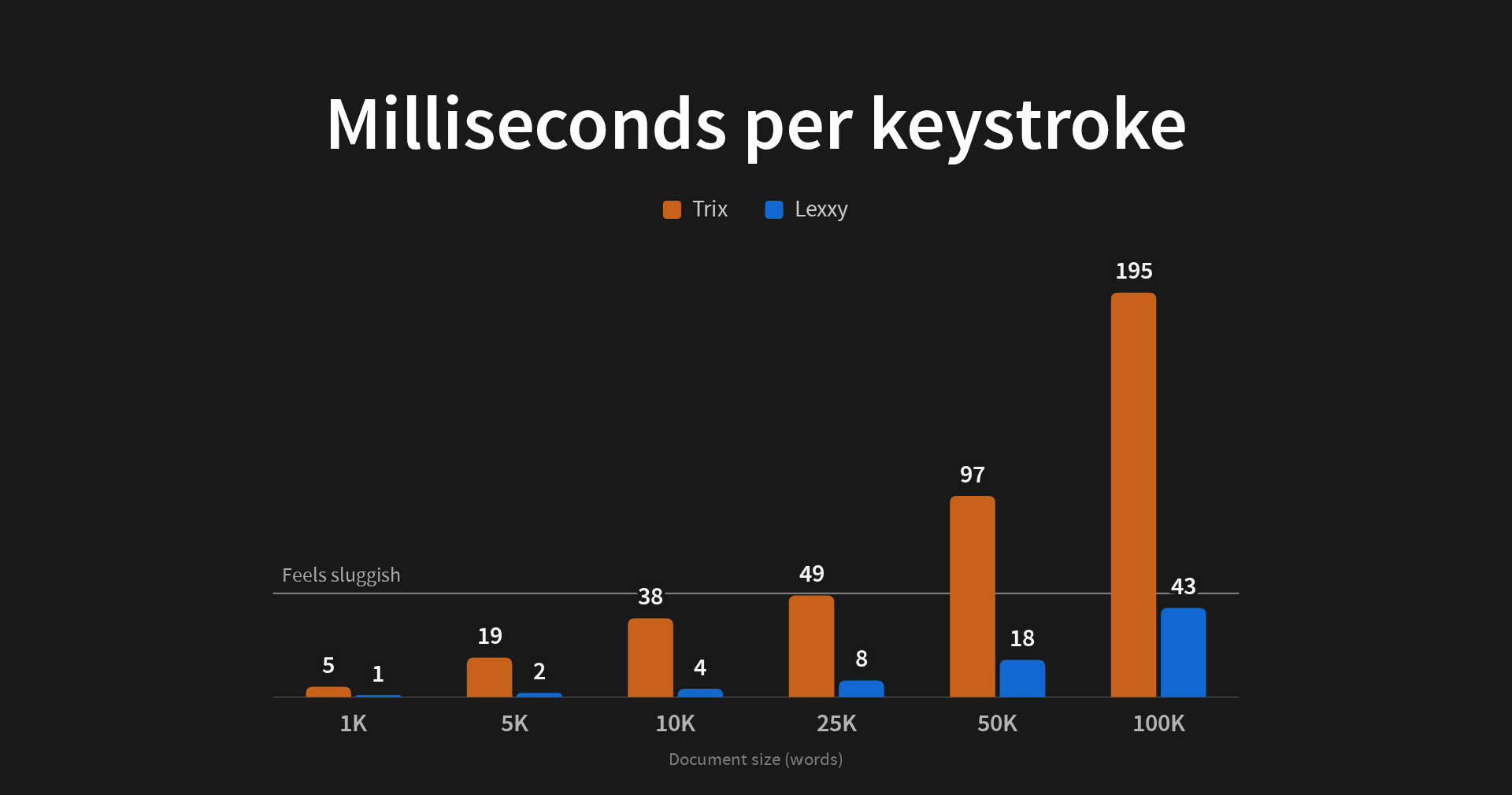
Lexxy is fast, because Lexical is fast. In a ten thousand word document, Trix takes thirty-eight milliseconds to process a keystroke. Lexxy takes four. Above fifty milliseconds, the editor starts feeling sluggish. Compared to Trix, Lexxy brought a whole new performance regime.
Accessibility
Accessibility in Trix was not great. In general, building accessible experiences for rich text editors built on top of contenteditable is quite hard.
We had a dream team to help with Lexxy accessibility. Bruno Prieto worked with Michael Berger, our accessibility champion at 37signals, to bring the bar to where we wanted it to be. Bruno is an outstanding programmer who happens to be blind, so he knows one thing or two about accessibility, and he delivered.
As a result, in Lexxy everything is reachable with the keyboard. The editor announces itself properly to screen readers, and it gets a thousand details right so that the editing experience using a screen reader is fantastic. You can learn more about accessibility in our docs.
Security
The latest AI models have resulted in an unprecedented explosion of vulnerabilities found, and we took this thread quite seriously.
Lexxy counted with programmers of the caliber of Jeremy Daer and Mike Dalessio helping to make it more secure. We have put a lot of attention to sanitizing the editor contents, validating attachment URLs and making sure that the types of attachments and nodes the editor support are allow-listed. Lexxy also comes with preliminary Trusted Types support, to offer CSP-level control over certain DOM manipulation APIs. The trusted types policy is there, but we are not enforcing it everywhere yet.
Agents
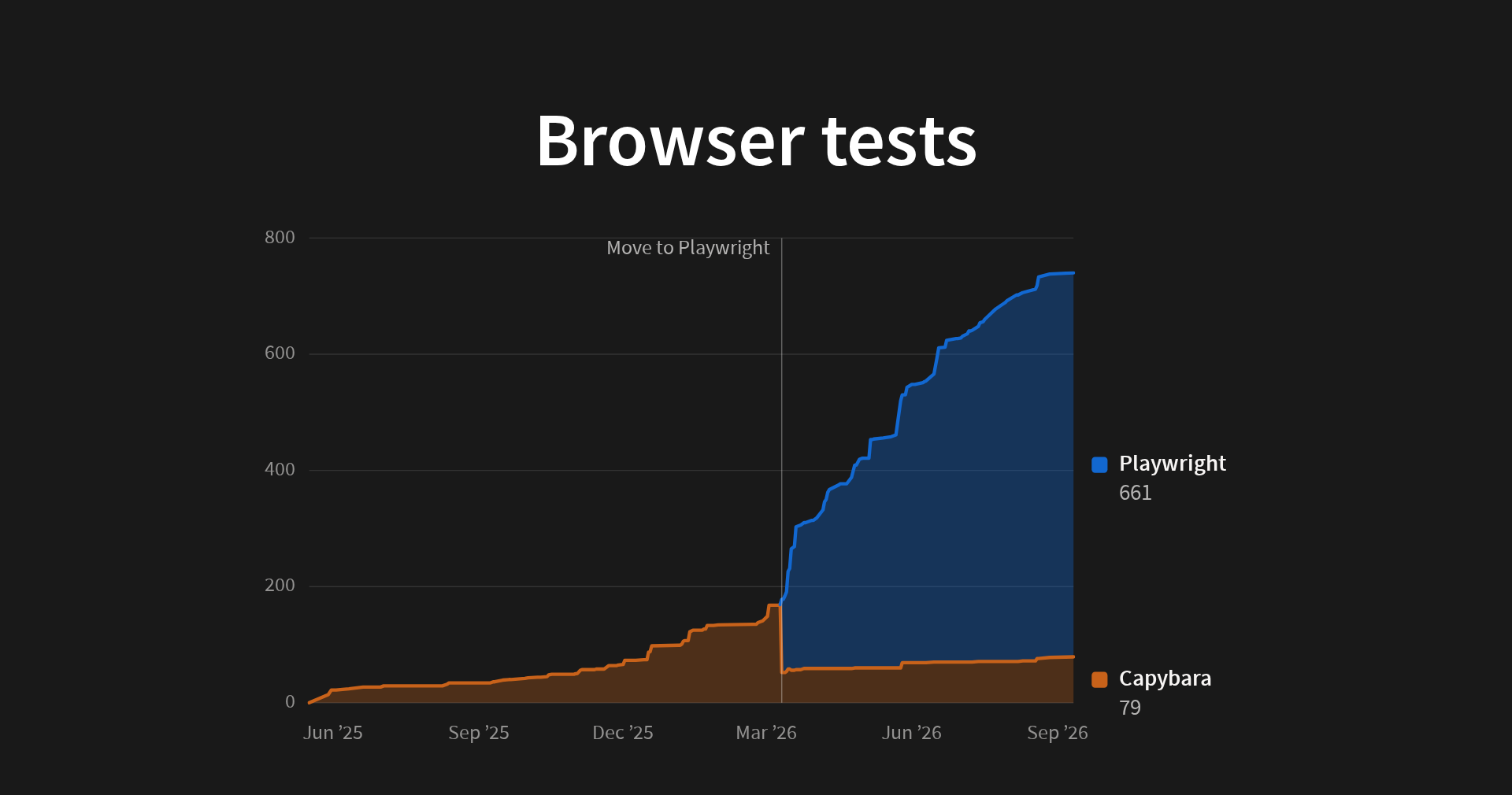
We started Lexxy using Claude since day one. A main lesson was that an agent needs to drive the editor like a user does. The best decision we made in this project was moving the system tests from Capybara to Playwright: three browsers instead of one, a suite that runs in seconds, and a much more faithful clipboard, keyboard and focus. This represented a tremendous improvement in how agents could close the loop by themselves. Write a test, see it fail, fix it, see it pass. We have more than six hundred browser tests today.
With a solid testing foundation in place, we could start fixing bugs in large batches. As mentioned, getting a text editor right implies a ton of work, and the kind of backlog we got at some point would have have buried us in pre-agent times. We also used agents to validate the fixes: an agent reproduces the bug in the public Lexxy sandbox, checks that it’s gone with the branch applied, and labels the pull request.
Agents were essential to get Lexxy done with the people and the deadlines we had: we are a small company, and the same people were shipping two products in parallel.
The new Rails default
We believe Lexxy is the best rich text editor out there right now, and we are going to make it the default in Rails next.
If you’re starting a Rails application today, use Lexxy. If you’re using Action Text with a standard configuration, switch. It’s one line, and we’ve worked hard to make it seamless.
Sign up to get posts via email,
or grab the RSS feed.